
About
FAQs are very effective and important when you run a website and you receive lot of emails from your users who are your potential customers, bloggers, commenters or just visitors. There are chances that the queries you receive are same most of the times and you have to send same reply to each query again and again. As a business owner, this is a wastage of your support team’s time or your own precious time in just repeating the same boring answers to the same queries multiple times.
This plugin will be very profitable and time saving tool for your website as with this plugin you can add a list of most commonly and frequently asked questions and you can simply refer your users to this list, or visitors may stumble upon it themselves, saving you the time and trouble of responding to all the multiple emails of same query.
Moreover, after asking a question and waiting for the answer can delay the decision of your users to buy, join or for any other purpose on your website. During that time, you may loose a user completely or you may have to chase behind him to join, purchase or for any other purpose. But, with FAQs you can give your users the right information from beginning to end. This plugin is capable to be used as Tutorials, Help centers, Knowledge base or similar knowledge sharing tool to create a small wiki about all the information and functionalities on your website.
Since, people are time poor now, they may not want to read or go through huge writings, so this plugin provides you the option to Categorically display the FAQs with more than 4 designs. You can show FAQs in simple Links, or expanded view with answers, in grids, etc. There are various general widgets which can be placed anywhere on the site enabling you to place FAQs on different places.
Table of Content widget will show a table of content of all the categories, 2nd level categories and 3rd level categories with FAQs in them. This will also show a proper numbering of the content shown in it. You can choose to Expand it, Collapse it or provide the option to Expand / Collapse to your users. When this widget is placed on the view page, the current FAQ being viewed will be highlighted in this widget. In short, this widget will enable you to create a complete knowledge base or tutorial on your website.
KEY FEATURES
100% Responsive
The FAQs are optimized for all devices and will automatically adjust to the resolution of your website in Mobile phones, tablets and desktop.
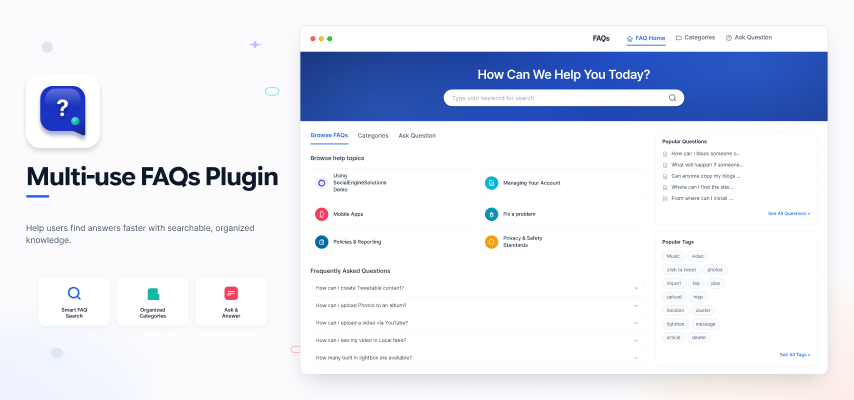
Banner with FAQ Search via AJAX
3 Attractive Designs in banner with option to enable / disable AJAX Search of FAQs, full width banner display, FAQs with Titles. You can also add Title and Description to the banner.
Re-ordering of FAQs
FAQs can be easily reordered by simply clicking on the FAQs and dragging them up or down from admin panel.
3 Unique and Attractive Design Layouts & more
Grid View, 2 List Views, Carousel, etc. are there in the plugin which will provide users an attractive layout and design.
More than 5 Views for Displaying Categories
This plugin provides you more than 5 designs for displaying categories and 2nd level categories on your website. Separate page for Browse Categories and Category View page for better display.
Settings to change text “FAQ” & “FAQs”
Admins can change the text “FAQ” & “FAQs” to any other text like “Knowledge base, Tutorials, Help Center,etc” using which you can use this plugin for many other functionalities.
Add & Manage FAQs
Admins can add and manage FAQs on their websites from the admin panel. Each FAQ can be managed, enabled and disabled easily from the admin panel.
Group FAQs by categories
FAQs can be grouped by 3 level of categories for their easy navigation and listing on your website. Users would be able to find their required information in categorical display.
Visibility Privacy for Each FAQ
Each FAQ can be made visible based on the Member Level, Network and Profile Type of the member who view it.
3rd Party Plugins Supported
You can add categories, FAQs of SocailEngine Plugins, our plugin, other 3rd party plugins or any other information / detail on your website to this plugin.
User can Ask Questions
Instead of writing FAQs for various features and sections of your website, if you users are not satisfied, they can Ask Questions from this plugin which you can answer from the admin panel or make FAQ of that plugin.
Share FAQs on social media
FAQs and categories can be shared on social media as well thereby increasing the popularity of your website. When people will find anything useful, chances are they will share it with their friends too.
Import of FAQs from CSV
You can easily import FAQs on your website from the admin panel of this plugin from a csv file into all the 3 level of categories. Importing FAQs via csv will create FAQs in bulk on your website in very less time.
Allow People to Comment & Like
Your users can Comment and Like on individual FAQ thereby enabling your users to express their thoughts and liking for an FAQ. This will help other people visiting the same FAQ on your website.
Allow People to Rate
Your users can give rating on the FAQs on your website. You can choose to display the FAQs on your website based on the rating, so that people can read most rated FAQs first.
Allow People to mark FAQs as Helpful
Your users can mark FAQs as Helpful on your website. You can choose to display the FAQs on your website based on the helpful statistics, so that people can read most helpful FAQs first.
Tag Keywords for Better Searching
You can add tags to FAQs which will help your users to easily and quickly search the questions of their interest.
Simple and Clear View Page for FAQs
This plugin provides very simple and clear view page for the FAQs on your website which is appropriate to display the information very neatly and easily readable.
KEY FEATURES
- Choose text for “FAQ” and “FAQs”.
- Choose text for the URL “faq” and “faqs”.
- Admin can Add & Manage FAQs.
– Admin can reorder the FAQs from Manage section - Add and manage Categories, 2nd-level categories and 3rd level categories.
- Based on Member Levels of the user, Admin can enable / disable them:
– to view FAQs
– to ask question
– to comment on FAQs
– to rate FAQs
– to select FAQs as Helpful - Admin can import FAQs via CSV file.