
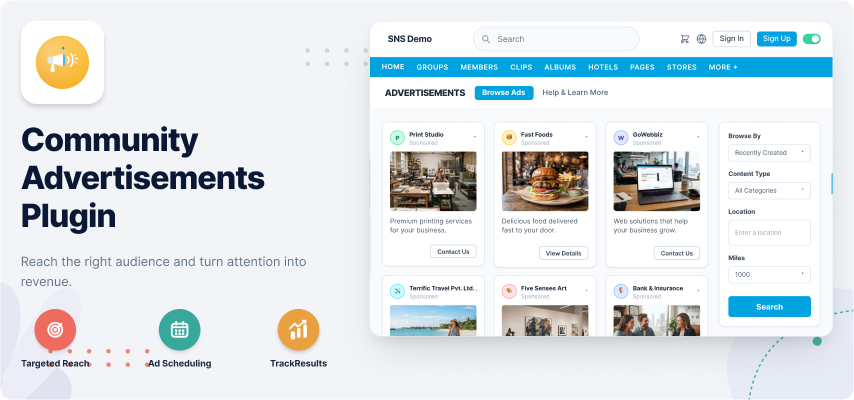
What is the need of this Plugin?
- Advertising gives companies and businesses the opportunity to build up a brand and an identity.
- Attractive Ads with different view Types will increase the chances of making it more Popular.
- Great source of earning revenue and simply creates the awareness among social communities.
- If any company wants to introduce or launch a new product in the market, advertising will make a ground for the product.
- Create awareness for valuable content with a call to action.
- More Ads More Customers and more Popularity to your Business.
Ads Creation and Management
Ads Creation
Advertisements can be easily created on your website with the help of this plugin. It provides you the various new exciting features which make it different from other Advertisements Tools. But before creating it you have to first enable the Packages from Admin Panel.
Also Admin is allowed to create and configure new packages(Free or Paid). You can choose any of the desired package which suits your Ad and create Ads for your Website.
Also you can create 4 different types of Ads by using this plugin:
- Boost a Post
- Promote Your Page
- Promote Content
- Get More Website Visitors.
3 different Ads Format such as Single Video, Single Image and Carousel make your Ads more attractive and effective.
Package Selection
Package selection is the first step which user have to choose before creating any Ad. It can be paid or Free. Choose the desired package and then click on ‘Create an Ad’ button.
Features provided in the Package will depend upon the Package creator who create it from Admin Panel.
Select Campaign & Category
You are allowed to create thousands of Campaigns and can categorized your Ads into various categories which make your advertising more managed, responsive and easy to understand.
Choose Ad Type
These advance Ad types will make your Ad creation experience much better and interesting on your website. Here you are provided with the 4 types of Ads which you can create easily. All these Ad types will be enabled from Admin Panel while Package Creation.
Select Campaign & Category
You are allowed to create thousands of Campaigns and can categorized your Ads into various categories which make your advertising more managed, responsive and easy to understand.
Ad Format Selection
This step provides your members to create Ads with three amazing formats selection:
- Carousel Ads
- Single Image Ads
- Video Ads
Headings, Description and Destination URLs can be given in these Ads formats. CTA (Call To Action) buttons are also provided for all these formats.
Ads Management
This plugin also provides you the management of Ads on your website.
Once an Advertisement get started, the user is not able to edit it. But Admin have the rights to manage them.
In Admin Panel Ads can be managed under Manage Advertisements section.
Here Ads can be Viewed, Edit or Delete.You can also review your Ads whenever you require.
Also you can mark any Package as Default Package for your website which members can choose while creation of Ads.
Also Ads can be marked as Featured, Sponsored manually.Other details related your Ad get displayed here.
Ads can be manually marked as featured and Sponsored from Admin Panel if required.
Ad details can also be viewed here that are created by the users on your website.
Select Targeting for Ads
Targeting is the only feature with the help of which you can allow viewing of Ads to only limited members that match the constraints of Targeting which you have mentioned at the time of Ad creation.
Scheduling of Ads
You can set Date & Time(Start and End) for your Ads at the time of its creation.This scheduling will work for your Ads till the end date.
Also if you want your Ad to work forever then there is no need to give end date in Scheduling section.
View Ad
After its creation you can see recently created Ad with all its details like its Name, Status, Approved Date, Start date, Ad Type etc. If it is a free Ad then it will get start immediately, but if it is a Paid Ad then follow the next Step.
Make Payment
If it is a Paid Ad then it will only start after the successful payment through Payment Gateway. In order to complete the Payment, Click on Make Payment button after Ad creation. Payment feature for your Ads will only work if Admin have configured the Payment Gateway(PayPal) from Admin Panel. You can easily pay for your Ads by entering your PayPal Credentials.
Successful Transaction Message
Once the Payment for the Ad gets completed a beautiful interface will update the user with the successful transaction message at its end. This will describe the secure transaction which took place for Paid Ads on your website.
Ads are ready to show
Your Ads are now ready to show at various pages and widgets on your website.
This is the final Stage where you can check every aspect of your Ad and take its review time to time.
Free and Paid Packages
Do you want to monetize from the Advertisements on your website, then this is the right plugin with the help of which you can enable Packages for creating Ads on your website.
Advertisers / users will have to choose a package for an ad.It can be Free or Paid depending upon the requirement of the Package Creator.
For creating any Ad, Package should be first created and enabled on your website. You are allowed to create new package from Admin Panel under Manage Ads Packages section.
Pricing Model will work as Pay for Clicks / Views / Days.
Also you can mark any Package(free) as default Package on your website. You can also set Ads limit which user are allowed to create in a particular package.
Enable / Disable Packages
You can enable / disable packages for creating Ads on your website. If you disable packages, then the similar Ad creation settings will not apply from Member Level settings.
Package Alignment
Packages can be shown in Horizontal alignment or Vertical alignment.
Only the Existing package of the user will be shown in horizontal alignment only.
Package Title & Description
Each package can have its own title and description.
Ads Count
For each package you can choose the number of Ads users will be able to create on your website. You can also enter unlimited Ads for any Package.
Member Level
You can set the visibility of the package based on the member level of the user.
Price
A package can be made Free or Paid. So, you can enter the price of the Ad and choose the Billing Cycle to be charged:
a. One Time
b. Recurring Payment
Package Creation
You can create any number of Free & Paid packages on your website. This plugin supports payment via Paypal.Paid Packages can be charged One time payment or Recurring payment.
- Billing Duration: You can choose when a package should expire.
- 4 Types of Ads: You can choose any type of Ad among these for creation of Ads on your Website.
- Auto Approve Ads: You can choose to auto-approve Ads of paid packages and manually approve the free packages to ensure the quality of Ad content on your website.
- Automatically Marking as Featured or Sponsored: You can choose to automatically mark Ads created in higher packages as Featured or Sponsored so that Ad owners get more encouragement to subscribe to higher packages. This will give their Ads more visibility and weightage on your website.
- Ads Formats: You can create your Ads by using these 3 amazing Ad formats(Carousel, Single Image, Video) which totally change the look of your Ads.
- Targeting: You can enable Targeting for the Ads which you will create on your website. You can enable Network Targeting for your Ads as well.
Ad Campaigns
An advertising campaign is a series of advertisement messages that share a single idea and theme which make up an integrated marketing communication.
A set of ad groups that share a budget, location targeting, and other settings. Campaigns are often used to organize categories of products or services that you offer. In Community Advertisements you can have one or many ad campaigns running.
You can Manage, View and Delete Campaigns under My Campaigns Section where all the campaigns created by you will get listed. Also there are n no. of Ads that you can create in a single Campaigns depending upon the package which you have chosen at the time of Ad creation.
- Ads Count: As there are multiple Campaigns that you can create for your Ads. So this section will display the total number of Ads that are created in a particular Campaign / Campaigns.
- Views Count: The total overall count of Views for your Ads in a Campaign will get displayed in this column.
- Clicks Count: Similarly Clicks Count in a Campaign will depend upon the overall clicks on all the Ads in a Campaign.
- CTR(%) for Ads: Clickthrough rate (CTR) can be used to gauge how well your Ads are performing. CTR is the number of clicks that your Ad receives divided by the number of times your ad is Viewed: clicks ÷ impressions = CTR.
- Manage Campaigns: In My Campaigns section you can manage your Campaigns as well if you want. Basically you are managing the Ads that are present in any particular Campaign.
- Edit Campaigns: You can also edit campaigns by clicking on Edit link at My Campaigns Page. In this you can just edit the name for your Campaign.
- Delete Campaigns: If you want to delete any Campaign then you can do this as well. Simply by clicking on Delete Link or by selecting from the checkbox particularly you can delete any Campaign of your choice.
- Manage Ads in a Campaign: If you want to manage any Ad then you have to first go to its Campaign and after that you are able to manage that Ad. Once the Ad gets Started then you are not able to edit it. Only you can view or delete your Ad. Only Admin can edit your Ad if required.
4 Types of Ads
The different and amazing new functionality which enhance the quality of Ads are our different types of Ads.
Basically in Community Advertisements Plugin, we have four types of Ads which you can create on your website:
- Boost Post Ads
- Page Ads
- Website Content Ads
- External Website Ads
Boost Post Ads
- Boost Posts is a type of ad in Community Advertisements Plugin in which boosted Posts appear higher up in news feeds than non-boosted posts and are served to an audience beyond your existing page fans, these posts can be a relatively most reliable way to easily reach more potential customers.
- With the help of this Ad type, Posts will get boosted which you have posted from Activity feed, Page, your Profile or from anywhere on your website.This will increase the popularity of your Posts at various pages and widgets time to time.
- Options in Feed Type Settings should be enabled first from Admin Panel for the proper working of this Ad Type. By selecting this Ad type for your Ads, you can easily boost any post on your website and earn popularity among community.
Page Ads
- Promoting your Business Page is done by creating ads for your Page that will help you grow the awareness and visibility of your business.
- If you want to promote your business or local interest page, then this is the right type of Ad for you. Yo can easily promote any Page in three amazing Ad formats:
Carousel
Single Image
Video
- Also you can insert CTA (Call to Action) buttons for your Ads while its creation which makes it more appealing.
Website Content Ads
- Advertising of Content is the process of creating Ads with the intention of promoting that content through different Paid Models such as PPC, PPV and PPD.
- With its help you can select any 3rd Party Modules(Plugins) which you have integrated with your package and promote any content substituted with those modules while creating an Ad.
- Content can be of any type(feed, text, video, image etc.)
External Website Ads
- Exclusively get more website visitors by using this Ad Type.
- You can advertise your website to large audience with the help of this Ad type. It simply allows you to make your website popular and get more customers for your Business. This type of Ad is very effective for the initial startup Businesses.
- If you want to promote any external website, then you can advertise it by giving the Heading, Description and Destination URL on which you want to redirect your Users.
Ads Targeting
- Ad Targeting is an advertisement technique where advertisements are placed in specific areas of the screen to increase “visibility” and “clickability” or to give tailor-made ads based on the user’s past interests and preferences.
- Targeted ads are meant to reach certain customers based on demographics, psychographics, behavior and other second-order activities that are learned usually through data exhaust produced by users themselves.It enables advertisers to reach target audience which is more likely to be interested in their ads.
- If the Advertiser want to show his Ads to the specific targeted members who match the mentioned criteria, then it can be enabled from ‘Target Settings’ section in Admin Panel.
- In Community Advertisements Plugin, you can do targeting for your Ads on the two basis :
– Profile Type Targeting
– Network Targeting
Profile Type Targeting
It is also known as Basic targeting that enables targeting on specific profile fields while creation of Ads such as:
- Personal Information
- First Name
- Last Name
- Gender
- Birthday
- Contact Information
- Website
- Twitter
- Facebook
- Personal Details
- About Me
Admin can configure which profile fields should be enabled for targeting
Advanced targeting enables targeting users of a specific profile type and further refining.
Ad Scheduling
- Scheduling for your Ads can be easily done at the time of creation if you want that your Ads should run for a particular time span.
- You are allowed to set Date and Time(Start & End) for your Ads as scheduling is very important for better and active working of Ads.
- Also if you want your Ad to get never expire, then there is no need to give End date and time.
- Then the expiry date of your Ad will ultimately depend on the expiry date of your Package in which you have created your Ad.
3 Advertising Models
The ratings for your Ads will based on 3 Advertising Models which determines the quality of your Advertisements. More number of actions means more popularity.
These Models are basically named as:
- Pay Per Click(PPC)
- Pay Per View(PPV)
- Pay Per Day(PPD)
Pay Per View (PPV)
Similarly this model follows the scenario in which charges are applied on the basis of per View for your Ad.
Whenever your Ad get viewed by other members,everytime the counter for views count will get incremented by 1.
Pay Per Click (PPC)
In this Model, the popularity of your Ad will depend upon the number of Clicks you get for your Ad by other members on your Website.
The charges in this model will be applied on the basis of per click which package creator has mentioned when he have created the package.
Pay Per Day (PPD)
In this advertising Model, some specific charges are applied/set for your Ad for each day.
- Advertising gives companies and businesses the opportunity to build up a brand and an identity.
- Attractive Ads with different view Types will increase the chances of making it more Popular.
- Great source of earning revenue and simply creates the awareness among social communities.
- If any company wants to introduce or launch a new product in the market, advertising will make a ground for the product.
- Create awareness for valuable content with a call to action.
- More Ads More Customers and more Popularity to your Business.
Ads Creation and Management
Ads Creation
Advertisements can be easily created on your website with the help of this plugin. It provides you the various new exciting features which make it different from other Advertisements Tools. But before creating it you have to first enable the Packages from Admin Panel.
Also Admin is allowed to create and configure new packages(Free or Paid). You can choose any of the desired package which suits your Ad and create Ads for your Website.
Also you can create 4 different types of Ads by using this plugin:
- Boost a Post
- Promote Your Page
- Promote Content
- Get More Website Visitors.
3 different Ads Format such as Single Video, Single Image and Carousel make your Ads more attractive and effective.
Package Selection
Package selection is the first step which user have to choose before creating any Ad. It can be paid or Free. Choose the desired package and then click on ‘Create an Ad’ button.
Features provided in the Package will depend upon the Package creator who create it from Admin Panel.
Select Campaign & Category
You are allowed to create thousands of Campaigns and can categorized your Ads into various categories which make your advertising more managed, responsive and easy to understand.
Choose Ad Type
These advance Ad types will make your Ad creation experience much better and interesting on your website. Here you are provided with the 4 types of Ads which you can create easily. All these Ad types will be enabled from Admin Panel while Package Creation.
Select Campaign & Category
You are allowed to create thousands of Campaigns and can categorized your Ads into various categories which make your advertising more managed, responsive and easy to understand.
Ad Format Selection
This step provides your members to create Ads with three amazing formats selection:
- Carousel Ads
- Single Image Ads
- Video Ads
Headings, Description and Destination URLs can be given in these Ads formats. CTA (Call To Action) buttons are also provided for all these formats.
Ads Management
This plugin also provides you the management of Ads on your website.
Once an Advertisement get started, the user is not able to edit it. But Admin have the rights to manage them.
In Admin Panel Ads can be managed under Manage Advertisements section.
Here Ads can be Viewed, Edit or Delete.You can also review your Ads whenever you require.
Also you can mark any Package as Default Package for your website which members can choose while creation of Ads.
Also Ads can be marked as Featured, Sponsored manually.Other details related your Ad get displayed here.
Ads can be manually marked as featured and Sponsored from Admin Panel if required.
Ad details can also be viewed here that are created by the users on your website.
Select Targeting for Ads
Targeting is the only feature with the help of which you can allow viewing of Ads to only limited members that match the constraints of Targeting which you have mentioned at the time of Ad creation.
Scheduling of Ads
You can set Date & Time(Start and End) for your Ads at the time of its creation.This scheduling will work for your Ads till the end date.
Also if you want your Ad to work forever then there is no need to give end date in Scheduling section.
View Ad
After its creation you can see recently created Ad with all its details like its Name, Status, Approved Date, Start date, Ad Type etc. If it is a free Ad then it will get start immediately, but if it is a Paid Ad then follow the next Step.
Make Payment
If it is a Paid Ad then it will only start after the successful payment through Payment Gateway. In order to complete the Payment, Click on Make Payment button after Ad creation. Payment feature for your Ads will only work if Admin have configured the Payment Gateway(PayPal) from Admin Panel. You can easily pay for your Ads by entering your PayPal Credentials.
Successful Transaction Message
Once the Payment for the Ad gets completed a beautiful interface will update the user with the successful transaction message at its end. This will describe the secure transaction which took place for Paid Ads on your website.
Ads are ready to show
Your Ads are now ready to show at various pages and widgets on your website.
This is the final Stage where you can check every aspect of your Ad and take its review time to time.
Free and Paid Packages
Do you want to monetize from the Advertisements on your website, then this is the right plugin with the help of which you can enable Packages for creating Ads on your website.
Advertisers / users will have to choose a package for an ad.It can be Free or Paid depending upon the requirement of the Package Creator.
For creating any Ad, Package should be first created and enabled on your website. You are allowed to create new package from Admin Panel under Manage Ads Packages section.
Pricing Model will work as Pay for Clicks / Views / Days.
Also you can mark any Package(free) as default Package on your website. You can also set Ads limit which user are allowed to create in a particular package.
Enable / Disable Packages
You can enable / disable packages for creating Ads on your website. If you disable packages, then the similar Ad creation settings will not apply from Member Level settings.
Package Alignment
Packages can be shown in Horizontal alignment or Vertical alignment.
Only the Existing package of the user will be shown in horizontal alignment only.
Package Title & Description
Each package can have its own title and description.
Ads Count
For each package you can choose the number of Ads users will be able to create on your website. You can also enter unlimited Ads for any Package.
Member Level
You can set the visibility of the package based on the member level of the user.
Price
A package can be made Free or Paid. So, you can enter the price of the Ad and choose the Billing Cycle to be charged:
a. One Time
b. Recurring Payment
Package Creation
You can create any number of Free & Paid packages on your website. This plugin supports payment via Paypal.Paid Packages can be charged One time payment or Recurring payment.
- Billing Duration: You can choose when a package should expire.
- 4 Types of Ads: You can choose any type of Ad among these for creation of Ads on your Website.
- Auto Approve Ads: You can choose to auto-approve Ads of paid packages and manually approve the free packages to ensure the quality of Ad content on your website.
- Automatically Marking as Featured or Sponsored: You can choose to automatically mark Ads created in higher packages as Featured or Sponsored so that Ad owners get more encouragement to subscribe to higher packages. This will give their Ads more visibility and weightage on your website.
- Ads Formats: You can create your Ads by using these 3 amazing Ad formats(Carousel, Single Image, Video) which totally change the look of your Ads.
- Targeting: You can enable Targeting for the Ads which you will create on your website. You can enable Network Targeting for your Ads as well.
Ad Campaigns
An advertising campaign is a series of advertisement messages that share a single idea and theme which make up an integrated marketing communication.
A set of ad groups that share a budget, location targeting, and other settings. Campaigns are often used to organize categories of products or services that you offer. In Community Advertisements you can have one or many ad campaigns running.
You can Manage, View and Delete Campaigns under My Campaigns Section where all the campaigns created by you will get listed. Also there are n no. of Ads that you can create in a single Campaigns depending upon the package which you have chosen at the time of Ad creation.
- Ads Count: As there are multiple Campaigns that you can create for your Ads. So this section will display the total number of Ads that are created in a particular Campaign / Campaigns.
- Views Count: The total overall count of Views for your Ads in a Campaign will get displayed in this column.
- Clicks Count: Similarly Clicks Count in a Campaign will depend upon the overall clicks on all the Ads in a Campaign.
- CTR(%) for Ads: Clickthrough rate (CTR) can be used to gauge how well your Ads are performing. CTR is the number of clicks that your Ad receives divided by the number of times your ad is Viewed: clicks ÷ impressions = CTR.
- Manage Campaigns: In My Campaigns section you can manage your Campaigns as well if you want. Basically you are managing the Ads that are present in any particular Campaign.
- Edit Campaigns: You can also edit campaigns by clicking on Edit link at My Campaigns Page. In this you can just edit the name for your Campaign.
- Delete Campaigns: If you want to delete any Campaign then you can do this as well. Simply by clicking on Delete Link or by selecting from the checkbox particularly you can delete any Campaign of your choice.
- Manage Ads in a Campaign: If you want to manage any Ad then you have to first go to its Campaign and after that you are able to manage that Ad. Once the Ad gets Started then you are not able to edit it. Only you can view or delete your Ad. Only Admin can edit your Ad if required.
4 Types of Ads
The different and amazing new functionality which enhance the quality of Ads are our different types of Ads.
Basically in Community Advertisements Plugin, we have four types of Ads which you can create on your website:
- Boost Post Ads
- Page Ads
- Website Content Ads
- External Website Ads
Boost Post Ads
- Boost Posts is a type of ad in Community Advertisements Plugin in which boosted Posts appear higher up in news feeds than non-boosted posts and are served to an audience beyond your existing page fans, these posts can be a relatively most reliable way to easily reach more potential customers.
- With the help of this Ad type, Posts will get boosted which you have posted from Activity feed, Page, your Profile or from anywhere on your website.This will increase the popularity of your Posts at various pages and widgets time to time.
- Options in Feed Type Settings should be enabled first from Admin Panel for the proper working of this Ad Type. By selecting this Ad type for your Ads, you can easily boost any post on your website and earn popularity among community.
Page Ads
- Promoting your Business Page is done by creating ads for your Page that will help you grow the awareness and visibility of your business.
- If you want to promote your business or local interest page, then this is the right type of Ad for you. Yo can easily promote any Page in three amazing Ad formats:
Carousel
Single Image
Video - Also you can insert CTA (Call to Action) buttons for your Ads while its creation which makes it more appealing.
Website Content Ads
- Advertising of Content is the process of creating Ads with the intention of promoting that content through different Paid Models such as PPC, PPV and PPD.
- With its help you can select any 3rd Party Modules(Plugins) which you have integrated with your package and promote any content substituted with those modules while creating an Ad.
- Content can be of any type(feed, text, video, image etc.)
External Website Ads
- Exclusively get more website visitors by using this Ad Type.
- You can advertise your website to large audience with the help of this Ad type. It simply allows you to make your website popular and get more customers for your Business. This type of Ad is very effective for the initial startup Businesses.
- If you want to promote any external website, then you can advertise it by giving the Heading, Description and Destination URL on which you want to redirect your Users.
Ads Targeting
- Ad Targeting is an advertisement technique where advertisements are placed in specific areas of the screen to increase “visibility” and “clickability” or to give tailor-made ads based on the user’s past interests and preferences.
- Targeted ads are meant to reach certain customers based on demographics, psychographics, behavior and other second-order activities that are learned usually through data exhaust produced by users themselves.It enables advertisers to reach target audience which is more likely to be interested in their ads.
- If the Advertiser want to show his Ads to the specific targeted members who match the mentioned criteria, then it can be enabled from ‘Target Settings’ section in Admin Panel.
- In Community Advertisements Plugin, you can do targeting for your Ads on the two basis :
– Profile Type Targeting
– Network Targeting
Profile Type Targeting
It is also known as Basic targeting that enables targeting on specific profile fields while creation of Ads such as:
- Personal Information
- First Name
- Last Name
- Gender
- Birthday
- Contact Information
- Website
- Personal Details
- About Me
Admin can configure which profile fields should be enabled for targeting
Advanced targeting enables targeting users of a specific profile type and further refining.
Ad Scheduling
- Scheduling for your Ads can be easily done at the time of creation if you want that your Ads should run for a particular time span.
- You are allowed to set Date and Time(Start & End) for your Ads as scheduling is very important for better and active working of Ads.
- Also if you want your Ad to get never expire, then there is no need to give End date and time.
- Then the expiry date of your Ad will ultimately depend on the expiry date of your Package in which you have created your Ad.
3 Advertising Models
The ratings for your Ads will based on 3 Advertising Models which determines the quality of your Advertisements. More number of actions means more popularity.
These Models are basically named as:
- Pay Per Click(PPC)
- Pay Per View(PPV)
- Pay Per Day(PPD)
Pay Per View (PPV)
Similarly this model follows the scenario in which charges are applied on the basis of per View for your Ad.
Whenever your Ad get viewed by other members,everytime the counter for views count will get incremented by 1.
Pay Per Click (PPC)
In this Model, the popularity of your Ad will depend upon the number of Clicks you get for your Ad by other members on your Website.
The charges in this model will be applied on the basis of per click which package creator has mentioned when he have created the package.
Pay Per Day (PPD)
In this advertising Model, some specific charges are applied/set for your Ad for each day.