
About
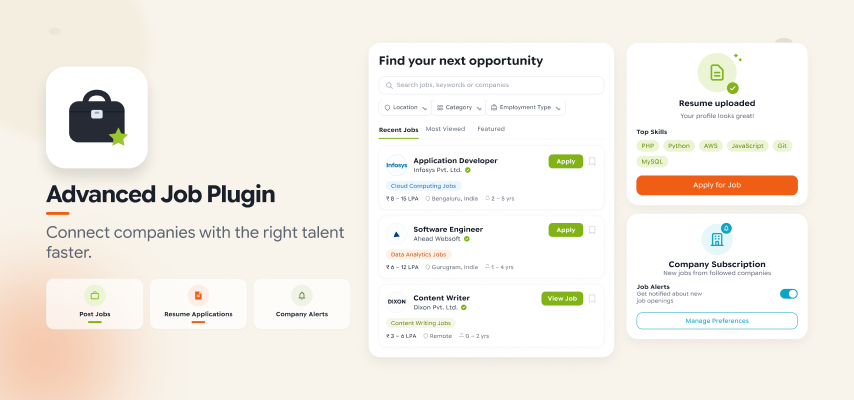
Transform your SocialEngine community into a powerful professional employment and recruitment platform with the Advanced Job Plugin. Give your members, companies, recruiters, and businesses the tools they need to create job opportunities, discover talent, manage applications, and connect with qualified candidates—all within your SocialEngine website.
The Advanced Job Plugin brings the core functionality of a professional job portal directly into your social network. Members can create companies, publish unlimited job opportunities, define detailed job requirements, receive applications, collect resumes, manage applicants, and communicate with candidates.
At the same time, job seekers can discover relevant opportunities, search and filter jobs, save their favorite jobs, subscribe to companies, receive job notifications, and apply for positions by submitting their details and resumes.
Whether you want to build a community-based job board, professional networking platform, recruitment portal, employment website, or business-oriented social network, this plugin provides the features required to create a complete hiring ecosystem.
Build a Professional Job Marketplace
Create a dedicated employment environment inside your SocialEngine community where companies can connect with talented professionals.
With the Advanced Job Plugin, your members can become both job providers and job seekers.
Companies and recruiters can:
- Create company profiles
- Publish job opportunities
- Add detailed job requirements
- Specify salary and compensation
- Define required experience
- Select employment types
- Specify education requirements
- Add job locations
- Add required skills
- Manage applicants
- Review resumes
- Contact candidates
- Receive application notifications
Job seekers can:
- Browse available jobs
- Search for relevant positions
- Filter jobs according to their preferences
- View detailed job information
- Favorite jobs
- Like and share jobs
- Subscribe to companies
- Receive new job notifications
- Apply directly from the job page
- Upload resumes
- Track relevant opportunities
This creates a complete connection between employers, recruiters, professionals, and job seekers.
Unlimited Job Postings
Allow job owners to create and publish as many job opportunities as permitted by your site’s configuration.
Every job can contain detailed information so candidates have a clear understanding of the position before applying.
Job owners can provide:
- Job title
- Required skills
- Job location
- Job category
- Short description
- Detailed job description
- Salary
- Additional compensation
- Required experience
- Employment type
- Education level
- Company information
- Contact information
- SEO information
This makes each job listing informative, professional, and easier for candidates to evaluate.
Complete Job Information
Create detailed job listings instead of simple text-based job posts.
Job owners can provide all the information candidates need before submitting an application.
Job Title
Add a clear title that describes the position being offered.
Job Skills
Specify the skills required for the position so candidates can determine whether they are a suitable match.
Job Location
Define where the position is located and help candidates identify opportunities based on location.
Short Description
Provide a brief summary of the job opportunity.
Detailed Description
Add complete information about the position, responsibilities, requirements, and other relevant details.
This structured approach helps create professional job listings that are easier to browse and search.
Detailed Job Requirements
Go beyond basic job descriptions by providing structured employment requirements.
Job owners can specify:
- Salary
- Other compensation
- Experience requirements
- Employment type
- Education requirements
- Industry
- Job category
- Required skills
- Location
This gives candidates more information and helps them determine whether an opportunity matches their professional background.
Easy Company Creation
Companies can be created directly through the job creation workflow.
Job owners can create multiple companies and associate their job opportunities with the appropriate company.
Company information can include:
- Company name
- Company website
- Company description
- Industry
- Company cover photo
Once created, the company gets its own profile where users can learn more about the organization and its available opportunities.
Customizable Company Profiles
Give companies their own professional presence within your SocialEngine website.
Company owners can manage their company information and update important details whenever necessary.
Company profiles can include:
- Company name
- Website URL
- Company description
- Industry
- Cover photo
- Associated job listings
- Subscribers
This creates a central destination where job seekers can learn about a company and explore its available positions.
Company Subscription
Allow job seekers to subscribe to companies they are interested in.
Once a user subscribes to a company, they can receive notifications and updates when that company publishes new job opportunities.
This is particularly useful for candidates who are interested in working for specific organizations.
Instead of repeatedly searching for new jobs, users can subscribe once and stay informed about future opportunities.
Job Applications with Resume Upload
Make applying for jobs simple for candidates.
Users can apply directly from the job profile page using the Apply for Job functionality.
The application form can collect relevant candidate information, including:
- Name
- Mobile number
- Current location
- Resume
Candidates can upload their resumes in supported file formats, allowing job owners to review applicant information directly from their job management interface.
Resume-Based Recruitment
Create a more professional recruitment process by allowing applicants to submit their resumes along with their applications.
This gives job owners access to candidate information that can be reviewed when evaluating applicants.
Instead of relying only on comments or messages, companies can collect structured applications and supporting documents through the job listing.
Job Dashboard
Every job can have a dedicated management dashboard where the job owner can control important aspects of the listing.
The dashboard provides tools for managing:
- Job information
- Job image
- Job administrators
- Contact information
- SEO settings
- Applicants
- Job location
- Styling
- Other job settings
This gives job owners greater control over their job listings without requiring them to contact the site administrator for routine changes.
Edit Job Information
Job owners can update the information associated with their job from the job dashboard.
This makes it possible to keep job listings accurate when requirements, descriptions, compensation, or other information changes.
Job Administrators & Roles
Allow job owners to assign additional administrators to their job listings.
Job roles can be useful when multiple people are involved in the recruitment process.
For example, a company may have:
- HR managers
- Recruiters
- Hiring managers
- Department administrators
These users can help manage the job according to the permissions assigned to them.
Contact Information
Job owners can provide professional contact information for their listings.
Supported information can include:
- Name
- Phone
- Facebook URL
- Website URL
This information can be managed through the job dashboard and displayed on the job profile.
Job SEO Management
Give job owners control over important SEO information.
Each job can have dedicated SEO details such as:
- SEO title
- SEO keywords
- SEO description
This can help improve the visibility of job listings in search engines and make individual employment opportunities easier to discover online.
Manage Applicants
Give job owners a dedicated area for managing candidates who have applied for their jobs.
From the applicant management section, job owners can view application information and communicate with candidates.
Administrators can also manage or cancel applications when necessary.
This provides a centralized recruitment workflow instead of requiring employers to manage applications manually outside the platform.
Direct Candidate Communication
Job owners can communicate with applicants directly from the applicant management section.
This makes it easier for recruiters and employers to follow up with candidates and continue the recruitment process.
Custom Publish Date & Time
Give job owners control over when a job becomes active.
During job creation, users can specify a custom publishing date and time.
The job can then become visible according to the configured schedule.
This is useful for:
- Planned recruitment campaigns
- Upcoming vacancies
- Scheduled hiring announcements
- Recruitment drives
- Future employment opportunities
Job Categories
Keep your job marketplace organized with a structured category system.
Administrators can create multiple levels of job categories, including:
- Parent categories
- Second-level categories
- Third-level categories
This makes it easier for users to browse and discover jobs based on their professional interests.
Industries
Administrators can create and manage industries from the plugin’s administration panel.
Job owners can then select the relevant industry while creating their jobs.
Industries also provide an additional way to categorize companies and improve job discovery.
Examples could include:
- Information Technology
- Finance
- Healthcare
- Education
- Marketing
- Construction
- Retail
- Hospitality
- Manufacturing
The actual industry structure can be customized according to your website’s requirements.
Employment Types
Create a flexible employment classification system.
Administrators can define employment types that job owners can select when creating job listings.
This allows your website to support different hiring models such as:
- Full-time
- Part-time
- Contract
- Temporary
- Internship
- Freelance
The available employment types can be managed from the admin panel.
Job Locations
Make job location an important part of the recruitment experience.
Job owners can specify the location of each position, allowing candidates to understand where the job is based before applying.
Location information can also be used as part of job discovery and search.
Advanced Job Search
Help job seekers quickly find opportunities that match their requirements.
The Advanced Job Plugin includes configurable search filters that can be placed on widgetized pages.
Users can search for jobs using different criteria and narrow down large numbers of listings to find relevant opportunities.
This creates a more efficient job discovery experience for candidates.
Featured Jobs
Highlight selected employment opportunities as Featured Jobs.
Featured listings can receive additional visibility through supported widgets and marketplace sections.
This can be useful for:
- Important vacancies
- Premium recruitment opportunities
- High-priority positions
- Promotional job listings
Sponsored Jobs
Create sponsored job listings that receive additional visibility.
Sponsored jobs can be highlighted separately from standard listings and can provide an additional promotional opportunity for employers.
This can also be used as part of a paid job-posting business model.
Hot Jobs
Highlight popular or important opportunities using the Hot Jobs label.
Hot jobs can be displayed through dedicated widgets and sections to help candidates discover high-interest opportunities.
Verified Jobs
Build additional trust by marking legitimate or approved opportunities as Verified Jobs.
Verified labels can help candidates identify jobs that have been reviewed or approved by your website administration.
This can be particularly useful for professional employment communities where trust and authenticity are important.
Job of the Day
Promote a specific job as the Job of the Day.
Administrators can define the start and end dates for the Job of the Day promotion, allowing the promotion to run automatically according to the configured schedule.
This provides a simple way to regularly highlight selected employment opportunities.
Member Level Controls
Create different job-posting permissions for different types of members.
Administrators can configure job-related capabilities based on SocialEngine member levels.
Available controls include:
- View jobs
- Create jobs
- Edit jobs
- Delete jobs
- Comment on jobs
- Auto-approve jobs
- Job view privacy
- Job comment privacy
- Custom CSS
- HTML in job entries
- Maximum allowed job entries
This gives administrators detailed control over who can use the recruitment features and how much access each member level receives.
Job Packages & Monetization
The Advanced Job Plugin supports an extension that allows you to create free and paid packages for job creation.
This means you can build a business model around job postings.
For example:
Free Package
Allow members to publish a limited number of jobs.
Professional Package
Provide more job postings and additional capabilities.
Premium Package
Offer higher posting limits and premium recruitment opportunities.
Administrators can create different packages based on their business requirements.
Notifications & Email Alerts
Keep both job seekers and employers informed with SocialEngine’s notification and email system.
Notifications can be triggered for important recruitment activities, including:
- When a user subscribes to a company
- When a subscribed company publishes a new job
- When a candidate applies for a job
- Other important job-related updates
This helps keep the recruitment process active and ensures users don’t miss relevant opportunities.
Personalized Job Discovery
Job seekers can stay connected to companies they are interested in and receive updates when new opportunities become available.
This creates a more personalized experience where candidates don’t have to continuously search for opportunities from their preferred companies.
Integration with Page & Business Directories
The Advanced Job Plugin can integrate with Page Directories Plugin and Business Directories Plugin.
This allows pages and businesses to create job opportunities directly from their respective profiles.
Businesses can therefore use their existing SocialEngine presence to publish employment opportunities and connect with potential candidates.
This creates a unified ecosystem connecting:
Businesses → Jobs → Candidates → Social Network
Powerful Administration Panel
Administrators get comprehensive control over the job marketplace.
The admin panel allows site owners to manage:
- Jobs
- Companies
- Applicants
- Categories
- Industries
- Employment types
- Education requirements
- Member-level permissions
- Job labels
- Approvals
- Promotions
- Statistics
- General plugin settings
This allows administrators to maintain control over the entire recruitment ecosystem.
Manage All Jobs
Administrators can view and manage jobs created by members throughout the website.
Jobs can be:
- Approved
- Disapproved
- Featured
- Sponsored
- Verified
- Marked as Hot
- Selected as Job of the Day
This provides complete control over job visibility and promotion.
Manage Companies
Administrators can manage companies created by users.
Company management can include information such as:
- Company title
- Owner
- Creation date
- Number of jobs
- Number of subscribers
This gives site owners visibility into the companies participating in their employment ecosystem.
Manage Applications
Administrators can access applications submitted by candidates.
Application information can include:
- Job title
- Applicant name
- Applicant email
- Mobile number
- Application information
- Creation date
This gives administrators a central overview of recruitment activity across the entire website.
Recruitment Statistics
Monitor the performance and activity of your job marketplace through available statistics.
Administrators can track metrics such as:
- Total jobs
- Approved jobs
- Featured jobs
- Sponsored jobs
- Verified jobs
- Favorite jobs
- Comments
- Views
- Likes
These insights can help administrators understand how actively their job marketplace is being used.
Highly Configurable Widgets
The Advanced Job Plugin includes 50+ configurable widgets that can be used to build different job and company pages.
Widgets can be arranged using SocialEngine’s Layout Editor, giving administrators flexibility over how job content is presented throughout the website.
Available widget functionality can be used to showcase:
- Latest jobs
- Featured jobs
- Sponsored jobs
- Hot jobs
- Verified jobs
- Job of the Day
- Companies
- Search
- Categories
- Job tags
- Other job-related content
10+ Widgetized Pages
Create dedicated employment pages using the plugin’s configurable widgetized pages.
Administrators can use the Layout Editor to arrange widgets and create custom job portal layouts according to their website design.
This provides significant flexibility when building a complete recruitment section within your SocialEngine community.
Create Different Types of Employment Platforms
The Advanced Job Plugin can be used for many different types of employment and recruitment websites.
Professional Job Portal
Create a dedicated website where companies publish jobs and candidates apply for them.
Social Recruitment Network
Combine professional networking with job opportunities.
Community Job Board
Allow members of a community to publish and discover employment opportunities.
Corporate Recruitment Platform
Give companies a dedicated space to manage their hiring requirements.
Local Employment Portal
Connect employers and candidates based on specific locations.
Industry-Specific Job Board
Build a specialized recruitment website around a particular industry.
Freelance & Contract Marketplace
Use job listings to connect businesses with professionals for project-based opportunities.
Business Community
Allow businesses and professionals within your SocialEngine network to connect through employment opportunities.
Build a Complete Hiring Ecosystem
The Advanced Job Plugin does more than add a basic job board to SocialEngine.
It creates a complete ecosystem where:
Companies create opportunities → Candidates discover jobs → Candidates apply → Employers manage applicants → Companies build followers → Candidates receive updates
At the same time, the social features of SocialEngine allow members to interact with, share, like, favorite, and discuss job opportunities.
This makes recruitment a natural part of your community rather than a separate system.
Key Benefits at a Glance
- Build a complete professional job portal
- Allow unlimited job postings based on your configuration
- Create multiple company profiles
- Publish detailed job listings
- Add salary and compensation information
- Define required experience
- Specify employment types
- Define education requirements
- Add job skills and categories
- Add job locations
- Allow candidates to apply online
- Support resume uploads
- Manage applicants
- Contact candidates
- Allow users to subscribe to companies
- Send job notifications and email alerts
- Provide advanced job search
- Add job tags and keywords
- Support List, Grid, and Map views
- Allow users to like, share, favorite, and report jobs
- Create Featured Jobs
- Create Sponsored Jobs
- Highlight Hot Jobs
- Verify job listings
- Promote Job of the Day
- Manage job privacy
- Manage comment privacy
- Provide job administration roles
- Customize job pages with CSS
- Add SEO information
- Create job categories
- Manage industries
- Manage employment types
- Manage education requirements
- Control access through member levels
- Set maximum job posting limits
- Create paid job packages with the extension
- Integrate with Page and Business Directories
- Monitor jobs, companies, and applications
- Track job statistics
- Use 50+ configurable widgets
- Build 10+ widgetized pages
- Fully responsive design
- Easy installation and setup
- Lifetime upgrades
- 90 days of free support